Follow the Taobao app and HAJOVIA screenshots to choose your items, enter the China warehouse address, pay and register your parcels. Check your own app for current button labels and payment options.
Use your HAJOVIA China warehouse as the Taobao delivery address
Where to go
HAJOVIA China warehouse address → Taobao Add address
What to do
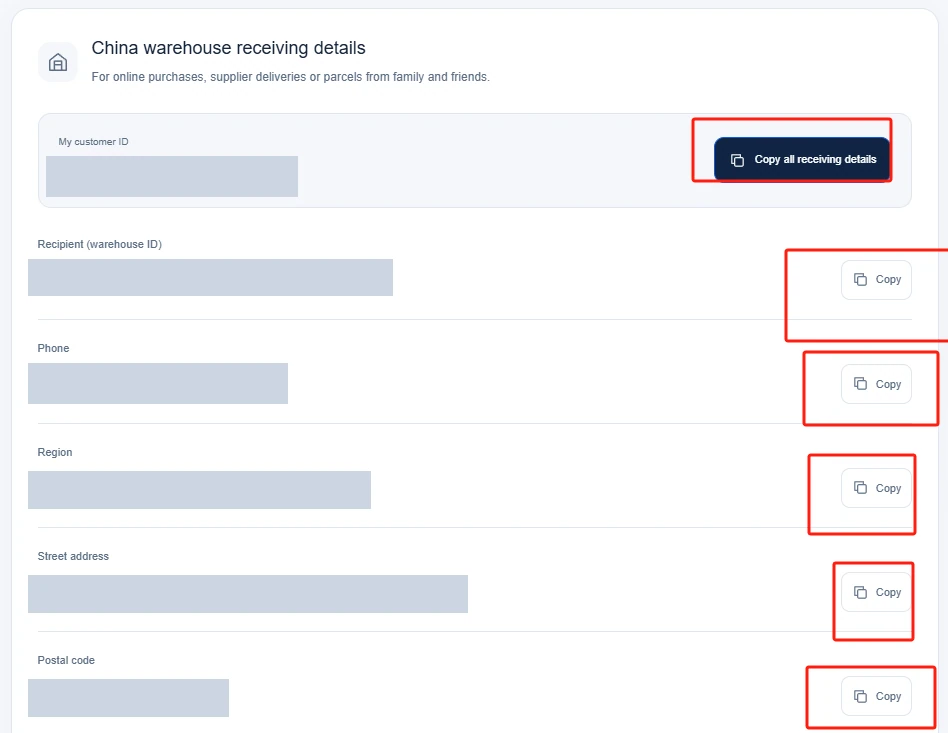
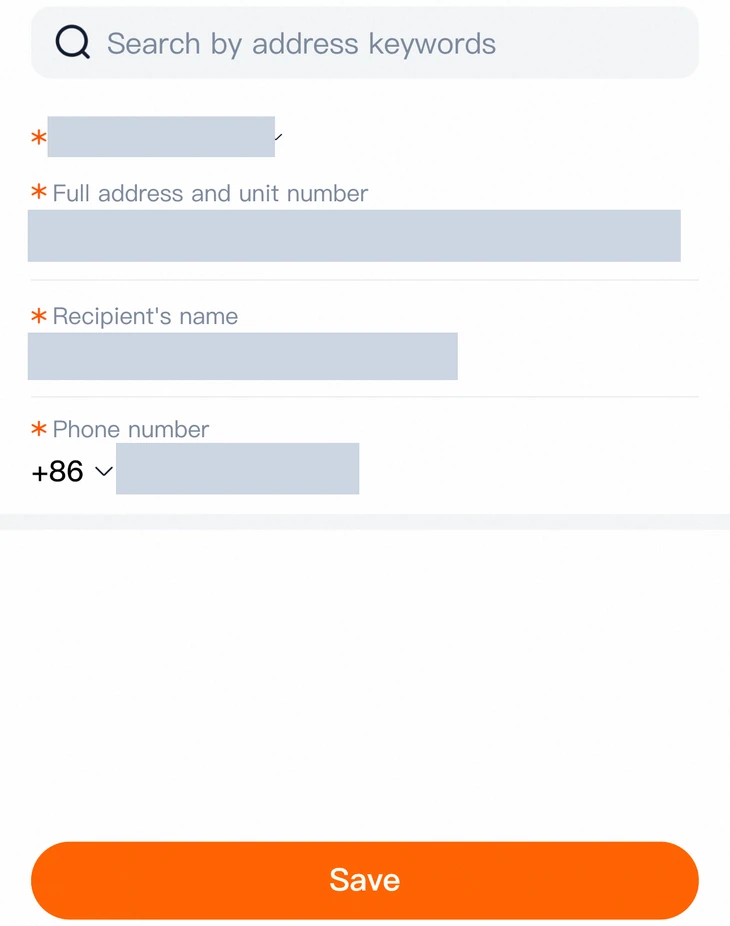
Sign in to HAJOVIA and open China warehouse address. Copy the recipient, warehouse phone, region and street address into the matching Taobao fields. Enter the complete HAJOVIA recipient name, including your customer ID in parentheses. If Taobao asks for a postal code, copy it from HAJOVIA as well. After saving, return to checkout and confirm that this order uses the warehouse address.
What you should see
The Taobao order shows the China warehouse address and your personal recipient name. The warehouse uses the customer ID in that name to identify your parcel.
Copy the current details from your own account. The screenshots show where to enter them.
Copy the details field by field from your HAJOVIA China warehouse address.In Taobao’s address form, match the recipient, phone, region and street address to their respective fields.
Chinese labels: a reading aid
Left: original Chinese labels you may encounter. Right: our English explanation. Wording and positions can vary by version. This is not a built-in platform translation.
价格
Price
规格
Variant / specification
颜色
Colour
尺码
Size
数量
Quantity
库存
Stock
发货时间
Dispatch time
运费
Shipping charge
售后
After-sales support
登录
Sign in
注册
Register
国家/地区
Country / region
手机号
Mobile number
验证码
Verification code
获取验证码
Get verification code
搜索
Search
筛选
Filter
客服
Customer support
加入购物车
Add to cart
立即购买
Buy now
收货人
Recipient
所在地区
Address region
详细地址
Street address
提交订单
Place order
待付款
Awaiting payment
支付成功
Payment successful
支付失败
Payment failed
我的订单
My orders
待发货
Awaiting dispatch
待收货
Awaiting delivery
查看物流
View shipping details
快递公司
Domestic courier
运单号
Tracking number
订单号
Purchase order number
申请退款
Request refund
退款/售后
Refund / after-sales
取消订单
Cancel order
单独购买
Buy individually
拼单
Group purchase
起批量
Minimum order quantity
混批
Mixed-item wholesale order
一件
One piece
一套
One set
自营
Platform-operated retail
商家
Seller
Reviewed sources and remaining checks
These are public official sources, not a sign-in or payment test of your account. Region and publication-version limitations can apply. Confirm eligibility with the current official account and checkout.
No questions have been published for this article yet.